

Inventory & Billing
- Pricing Display in Sales and Purchase entry screens in Modern View
With this new feature in the Modern View, users will now be able to lookup the last 3 selling or buying prices (depending on module) as well as costs in various transaction screens (some screen will not have this for confidentiality purposes, example Delivery Orders and Receiving).
The display also shows the dates and any discount offered. This will greatly help the person to quickly ensure the right pricing is given to the customer and to make good business decisions.

- Credit Limit and Outstanding information display in Modern View
With this new feature in Modern View, users will now be able to get visibility check on the customer outstanding amount and if the given credit limit has been overutilized. These set of information will be useful for the person to raise concern at point of order entry.
Ability to make prompt and correct decision can safeguard the business from any untoward debt risks.
Ability to make prompt and correct decision can safeguard the business from any untoward debt risks.

- Recover Related GRN option added to Delete Bill window
With this new feature added to the Delete Bill window, users can now delink GRN(s) when a supplier invoice is cancelled. These GRN(s) can later be used to link to new supplier invoice entered.
This ability to delink and relink records can help the person to gain speed, minimize error in invoice entry and maintain proper linked records in the system for traceability and checking.
- Recover Related PO option added to Delete Bill window
With this new feature added to the Delete Bill window, users can now delink Purchase Order (PO) when a GRN is cancelled. These POs can later be used to link to new GRN entered.
This ability to delink and relink records can help the person to gain speed, minimize error in GRN entry and maintain proper linked records in the system for traceability and checking.
- Transaction Listing with “Unpost/Repost” status for non-tax system
- Improved terminology on Purchase Invoice type
In Accounting, terminology used is very important. This is to ensure that the product is easily understood by accounting practitioners. In the past, we used laymen terms, and this led to some confusion. This change is to correct this so that it is easily understood and not misinterpreted. In addition to the change, a bubble icon is added to provide more information on the new terms and their application.
- Improved negative stock handling in system
Correct an erroneous situation where returns are not permitted when the current stock level is negative. With this change, it means that when stocks status is in negative and there is a genuine case to return stocks to an item, it is now possible to correct them by performing positive adjustments (seen as Credit Returns) in the Inventory and Billing module.

If you have any questions, please do not hesitate to reply back to below information, I will be able to assist you further.
With this new feature added to the Delete Bill window, users can now delink GRN(s) when a supplier invoice is cancelled. These GRN(s) can later be used to link to new supplier invoice entered.
This ability to delink and relink records can help the person to gain speed, minimize error in invoice entry and maintain proper linked records in the system for traceability and checking.
- Recover Related PO option added to Delete Bill window
With this new feature added to the Delete Bill window, users can now delink Purchase Order (PO) when a GRN is cancelled. These POs can later be used to link to new GRN entered.
This ability to delink and relink records can help the person to gain speed, minimize error in GRN entry and maintain proper linked records in the system for traceability and checking.
- Transaction Listing with “Unpost/Repost” status for non-tax system
Companies that are configured for non-tax can now see “Unpost/Repost” status of transactions in the Transaction Listing screen. This will make the display the same as those configured for tax.
With this, transactions status of P – Posted, U – Unpost and R – Report will be clearly displayed allowing users to take the next appropriate step should a change on the transaction be required.
- Item and footer level discount handling
As discount can be recognised and reported either as Nett Sales or Gross Sales with Discount tracked separately, we need to provide the same clarity during data entry made in tax system.
With this improvement, users now have the option and flexibility to work adeptly in accordance with their business reporting requirement.
With this, transactions status of P – Posted, U – Unpost and R – Report will be clearly displayed allowing users to take the next appropriate step should a change on the transaction be required.
- Item and footer level discount handling
As discount can be recognised and reported either as Nett Sales or Gross Sales with Discount tracked separately, we need to provide the same clarity during data entry made in tax system.
With this improvement, users now have the option and flexibility to work adeptly in accordance with their business reporting requirement.
- Improved terminology on Purchase Invoice type
In Accounting, terminology used is very important. This is to ensure that the product is easily understood by accounting practitioners. In the past, we used laymen terms, and this led to some confusion. This change is to correct this so that it is easily understood and not misinterpreted. In addition to the change, a bubble icon is added to provide more information on the new terms and their application.
- Improved negative stock handling in system
Correct an erroneous situation where returns are not permitted when the current stock level is negative. With this change, it means that when stocks status is in negative and there is a genuine case to return stocks to an item, it is now possible to correct them by performing positive adjustments (seen as Credit Returns) in the Inventory and Billing module.
- Adjusting GRN function in User Pin for Billing and I&B
The system has rectified an upgrade issue where access is not correctly applied. With this change, after the upgrade:
• For Inventory & Billing module → GRN will be included
• For Billing module → GRN (not applicable since this is for Inventory that does not come with B) will be excluded but Unpost/Repost will be included.
The system has rectified an upgrade issue where access is not correctly applied. With this change, after the upgrade:
• For Inventory & Billing module → GRN will be included
• For Billing module → GRN (not applicable since this is for Inventory that does not come with B) will be excluded but Unpost/Repost will be included.
- Improved handling of "Unpost/Repost" rights setting during upgrade process
Correct an issue with Upgrades where access attribute, Unpost/Repost, in the User DBF is not carried over to the upgraded version. With this change, regardless of whether this attribute is found in User DBF or not, the upgrade will always create the new User DBF with this attribute. This eliminates support issues during upgrading of customers and hence improve user experience.
Correct an issue with Upgrades where access attribute, Unpost/Repost, in the User DBF is not carried over to the upgraded version. With this change, regardless of whether this attribute is found in User DBF or not, the upgrade will always create the new User DBF with this attribute. This eliminates support issues during upgrading of customers and hence improve user experience.
Accounting
- Improved warning message on blank reference number in transaction
Reference Number field is very important as it facilitate referencing to transactions entered. It was not a mandatory field in the application. This causes issues to customers that wanted to have that ability but because users failed to enter them, they have to resort to various means to correct the data. With this change, customers that want to ensure a value is entered can turn on the setting, ., to enforce this during entry.
- Realignment of Ledger Listing screen report
Improving report aesthetics by realigning header of the report to follow the column information correctly in both classic and modern views.
This will cease misinterpretation of report and avoid confusion to users.
This will cease misinterpretation of report and avoid confusion to users.
Landing Page
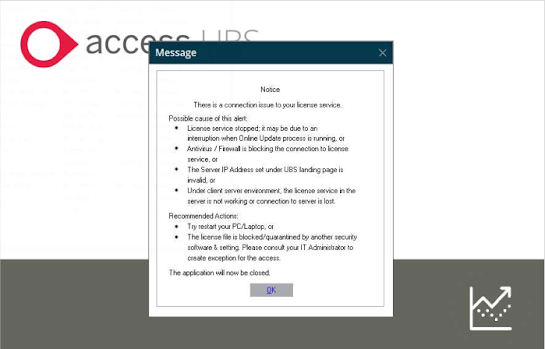
- Improved warning message on license issue
- Improved warning message on license issue
Instead of using a generic catch on all warning message when certain license conditions exist, the checking will now be more granular and contain more useful help on how to correct them. This will save time and effort for our partners and our support as they can now tell the exact cause without having to spend time to go through a check list of items.
- Enhanced workflow to close system after exit warning message
- Enhanced workflow to close system after exit warning message
System will now close when the warning message "No connection could be made because the target machine actively refuse it.127.0.0.1 Port 8900" is prompted.
This will prevent users from using a demo license with limited functionalities and date restrain that may have undesirable impact to their transactions.
This will prevent users from using a demo license with limited functionalities and date restrain that may have undesirable impact to their transactions.
Windows
- Windows 11 compatibility
Making UBS future proof to customers who are upgrading to Windows 11 devices now or in the future.
All Access UBS modules were tested and confirmed working fine in Windows 11 with no functional issues encountered.
- Windows 11 compatibility
Making UBS future proof to customers who are upgrading to Windows 11 devices now or in the future.
All Access UBS modules were tested and confirmed working fine in Windows 11 with no functional issues encountered.
If you have any questions, please do not hesitate to reply back to below information, I will be able to assist you further.
Vivid Solutions Sdn Bhd
Tel : 03-91722228
Mobile : 011-10161636
Mobile : 011-10161636
Email : infor@vivid.com.my


